Detailed Installation Guide
Learn how to add repositories and install plugins in CloudStream
1
Copy Repo Code
On our homepage, find your preferred repository and simply click on the "Shortcode" to automatically copy it to your clipboard.
✨ Auto-copy is enabled for all codes
2
Open App Settings
Open the CloudStream app on your phone or Android TV, and tap the Settings icon in the bottom menu.
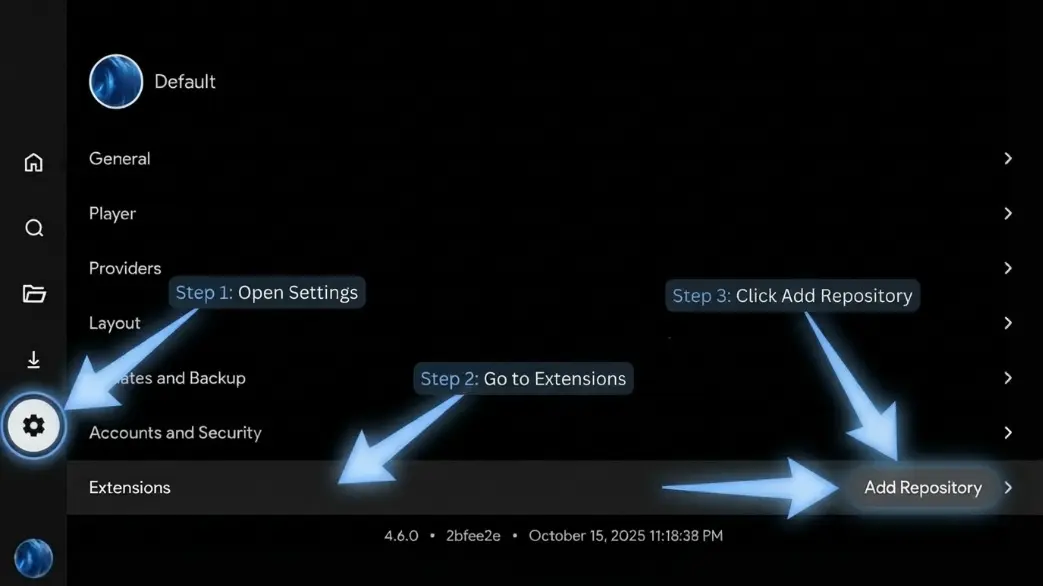
Tap the gear icon at the bottom right
3
Go to Extensions
In the settings menu, select "Extensions" and then click on the "Add Repository" button.
4
Paste the Code
Paste the code you copied from our website into the input field and click "Add". A list of available plugins will appear.
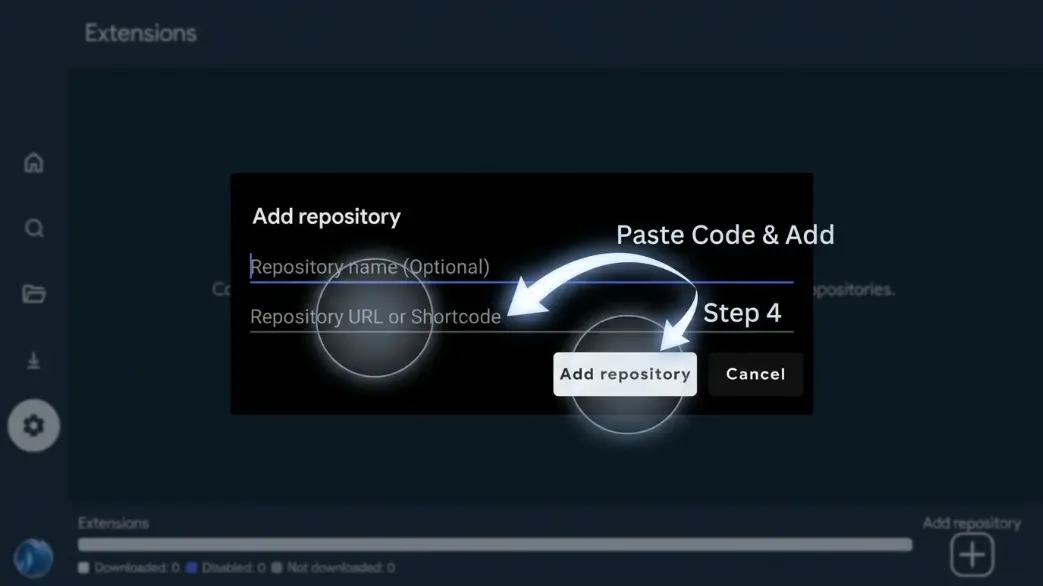
Paste the shortcode and click "Add"
5
Install Plugins
Select the plugins you want to use and click "Install". You are now ready to enjoy the content!
💡
Pro Tip: Always copy shortcodes that support your preferred language for the best experience.